

OWASPが開発したディレクトリ・ファイル探索ツール
- DirBuster -
Webアプリケーションの脆弱性診断において、コンテンツディスカバリー(ディレクトリ/ファイル列挙)は欠かせない工程です。その中でもDirBusterは、GUIベースで初学者でも手軽に使える人気のツールです。
本記事では、DirBusterの使い方を基礎から実演ベースで解説します。
また、公式サポートが終了している点、DirBusterの代替ツールについても解説していますので、ぜひご覧ください。
DirBusterとは
DirBusterは、Webサーバに存在するディレクトリやファイルをブルートフォース(総当たり)で探索するためのセキュリティ診断ツールです。
具体的には、あらかじめ用意されたワードリスト(辞書ファイル)を用いて、
- http://example.com/admin
- http://example.com/backup
- http://example.com/test
- http://example.com/old
- http://example.com/config.php
といったパスをHTTPリクエストとして順番に送信し、レスポンス(HTTPステータスコード)から有効なパスを判定します。
これにより、開発者が意図せず公開してしまった管理画面や設定ファイル、バックアップファイルなどを効率的に洗い出すことができます。
主な特徴
- ワードリスト(辞書ファイル)を使用して、Webサーバ上の隠れたディレクトリやファイルを総当たりで探索する
- OWASPが開発しており、脆弱性診断やペネトレーションテストで広く利用されている
- 再帰的な探索が可能
- HTTPステータスコード(200/301/403など)から有効なパスを判別する
- Javaで実装しており、GUI・CLIの両方に対応
- マルチスレッド
- Kali Linuxにプリインストールされている
- オープンソース・無料
注意事項
許可なく他者のサイトに使用しない
DirBusterは強力なツールである反面、その性質上、対象サーバに多数のリクエストを送信します。これは、たとえ善意の脆弱性診断であっても、無許可で実施した場合はサイバー攻撃とみなされる可能性があります。許可を得ていない環境では、絶対に使用しないでください。
学習や検証目的で使用する場合は、やられアプリなどの安全な環境を利用しましょう。
本記事では、代表的なやられアプリであるDamn Vulnerable Web Application(DVWA)を使用して、実演解説しています。
サポートが終了している
DirBusterはOWASP(Open Web Application Security Project)が開発しており、脆弱性診断やペネトレーションテストにおける初期情報収集フェーズで広く利用されてきました。GUIベースで初学者でも利用しやすいツールですが、2009年に開発およびメンテナンスを終了しています。
これは以下のようなリスクを伴います。
- 最新Webフレームワークのパス構成に対応していない。
- 脆弱性が発見されても修正されない。
- Javaのバージョンアップとの互換性問題が発生する可能性がある。
そのため、利用する際は次のような対策を推奨します。
対策1)Kali Linuxのようなプリインストール環境で使用する
プリインストール環境では、依存関係や互換性の問題があらかじめディストリビューション側で解決しているため、利用者は特別な設定を行うことなく、すぐに利用可能です。
※本記事では、Windows上の仮想環境に構築したKali Linuxを用いて、DirBusterの検証を行っています。
対策2)代替ツール(例:Gobuster、ffufなど)と併用する
当サイトでは、DirBusterのほかにもディレクトリ探索ツールの使い方を解説していますので、併せてご覧ください。
DirBusterのインストール
Kali Linuxには、DirBusterの実行に必要なJava環境、およびdirbusterパッケージが既にインストールされているため、別途インストールは必要ありません。
インストール状況の確認
$ apt list --installed | grep dirbuster

dirbuster/kali-rolling,now 1.0-1kali6 all [インストール済み、自動]
パッケージ情報の確認
$ apt show dirbuster
Package: dirbuster
Version: 1.0-1kali6
Priority: optional
Section: net
Maintainer: Kali Developers <devel@kali.org>
Installed-Size: 11.3 MB
Depends: default-jre
Homepage: https://www.owasp.org/index.php/Category:OWASP_DirBuster_Project
Download-Size: 4,066 kB
APT-Manual-Installed: no
APT-Sources: http://http.kali.org/kali kali-rolling/main amd64 Packages
Description: Web server directory brute-forcer
 DirBuster is a multi threaded java application designed to
 brute force directories and files names on web/application
 servers. Often is the case now of what looks like a web
 server in a state of default installation is actually not,
 and has pages and applications hidden within. DirBuster
 attempts to find these.
 .
 However tools of this nature are often as only good as the
 directory and file list they come with. A different
 approach was taken to generating this. The list was
 generated from scratch, by crawling the Internet and
 collecting the directory and files that are actually used
 by developers! DirBuster comes a total of 9 different
 lists, this makes DirBuster extremely effective at finding
 those hidden files and directories. And if that was not
 enough DirBuster also has the option to perform a pure
 brute force, which leaves the hidden directories and files
 nowhere to hide.
実行パスの確認
$ which dirbuster
/usr/bin/dirbuster
スクリプトの確認
$ cat /usr/bin/dirbuster
#!/bin/bash
java -Xmx256M -jar /usr/share/dirbuster/DirBuster-1.0-RC1.jar "$@"
Java環境もインストール済み
$ which java
/usr/bin/java

$ java --version
openjdk 21.0.9 2025-10-21
OpenJDK Runtime Environment (build 21.0.9+10-Debian-1)
OpenJDK 64-Bit Server VM (build 21.0.9+10-Debian-1, mixed mode, sharing)dirbusterコマンドを実行すると、Javaアプリケーションが起動します。
Kali LinuxにプリインストールされているWordlistsには、DirBuster向けの辞書ファイル(ワードリスト)が含まれており、/usr/share/wordlists/dirbusterディレクトリ配下に格納されています。
| ファイル名 | ワード数 |
|---|---|
| directory-list-lowercase-2.3-small.txt | 81,628 |
| directory-list-lowercase-2.3-medium.txt | 207,628 |
| directory-list-2.3-small.txt | 87,649 |
| directory-list-2.3-medium.txt | 220,545 |
| directory-list-1.0.txt | 141,694 |
| directories.jbrofuzz | 58,656 |
| apache-user-enum-2.0.txt | 10,341 |
| apache-user-enum-1.0.txt | 8,916 |
また、コンテンツディスカバリー(ディレクトリ/ファイル列挙)の用途で広く利用されているSecListsを使用することもできます。
DirBusterの起動
Kali LinuxのアプリケーションメニューからDirBusterを起動します。
アプリケーションメニュー:01-Reconnaissance>Web Scanning>dirbuster
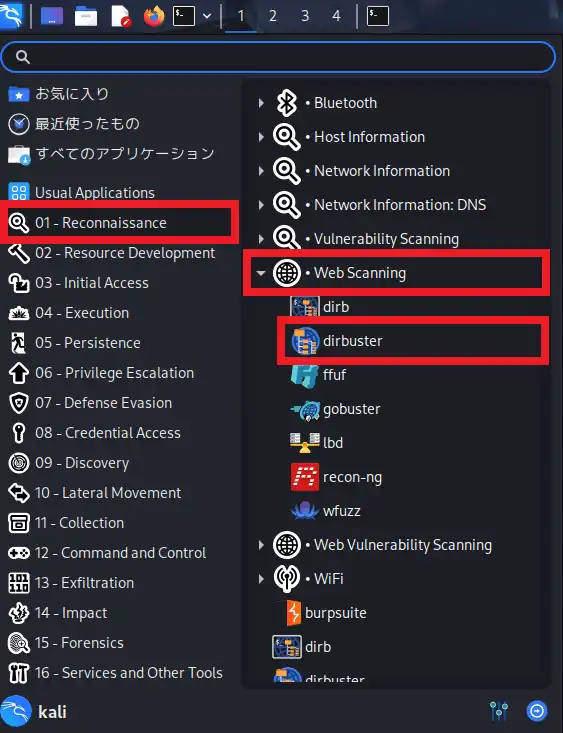
dirbusterをクリックすると、Javaで構築されたGUIアプリケーションが起動します。
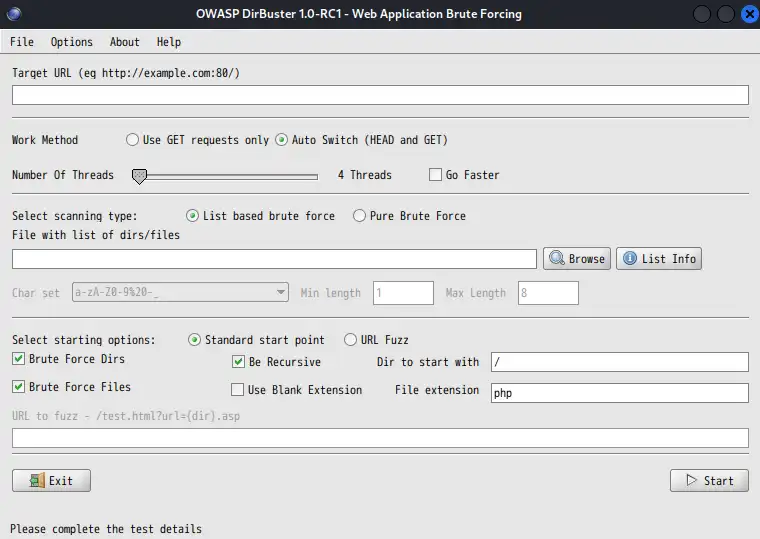
前述の通り、ターミナルからDirBusterを起動することもできます。
$ dirbusterDirBusterの使い方【実演解説】
このセクションでは、Windows上の仮想環境に構築したKali Linuxと、学習用の脆弱なWebアプリケーションであるDVWA(Damn Vulnerable Web Application)を用いて、DirBusterの使い方を実演解説します。
- DirBuster実行マシン
- Kali Linux 2025.4
- DirBuster 1.0-RC1
- スキャン対象マシン
- Ubuntu 24.04
- DVWA(Damn Vulnerable Web Application)
- 192.168.10.102
スキャン条件の設定
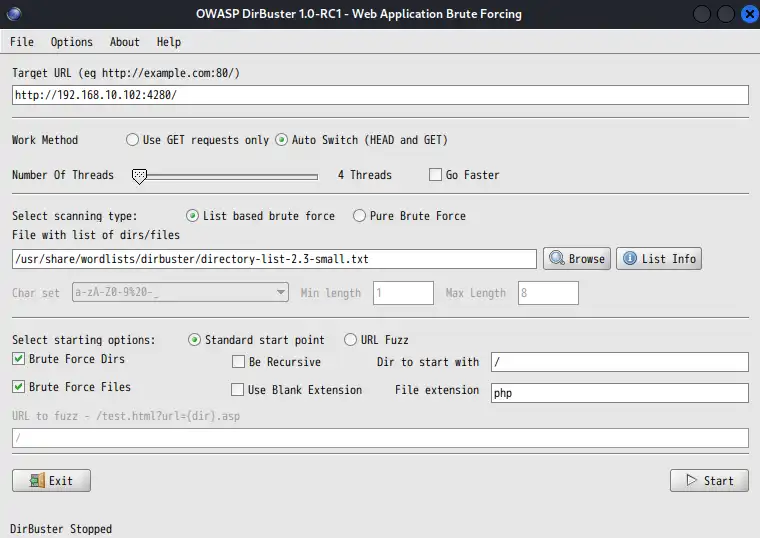
主な設定項目は以下のとおりです。
- Target URL(対象URL):http://192.168.10.102:4280
- Work Method(HTTPメソッド):Auto Switch(自動切り替え)
- Number of Threads(スレッド数):4
- Go Faster(高速化):なし
- Select scanning type(スキャン方式):List based brute force(リストベース)
- File with list of dirs/files(ワードリスト):/usr/share/wordlists/dirbuster/directory-list-2.3-small.txt
- Select starting options(開始オプション):Standard start point(標準開始位置)
- Brute Force Dirs(ディレクトリ探索):する
- Be Recursive(再帰的に実行):しない ※時間短縮のため
- Dir to start with(開始ディレクトリ):/
- Brute Force Files(ファイル探索):する
- Use Blank Extension(拡張子なしも探索):しない
- File extension(ファイル拡張子):php
スキャン開始
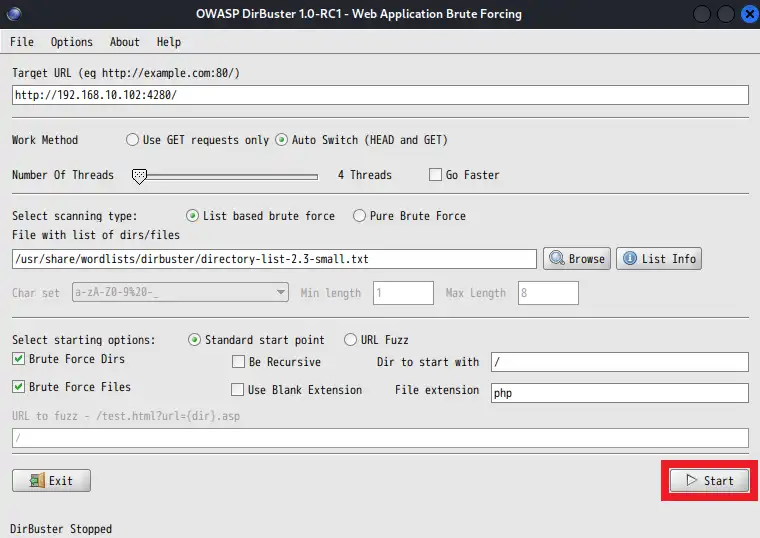
スキャン条件の設定が完了したら、画面下部のStartボタンをクリックしてスキャンを開始します。スキャン開始と同時に、DirBusterは以下の処理を行います。
- ワードリスト(辞書ファイル)に含まれる単語を1行ずつ読み込む
- 指定したスレッド数でHTTPリクエストを並列送信
- レスポンスのHTTPステータスコードを解析
- 有効と判断したパスを結果として記録
スキャン結果の確認
スキャン結果画面は、4種類のタブで構成されており、スキャン実行中も進捗状況や検出結果を確認できます。
Scan Informationタブ
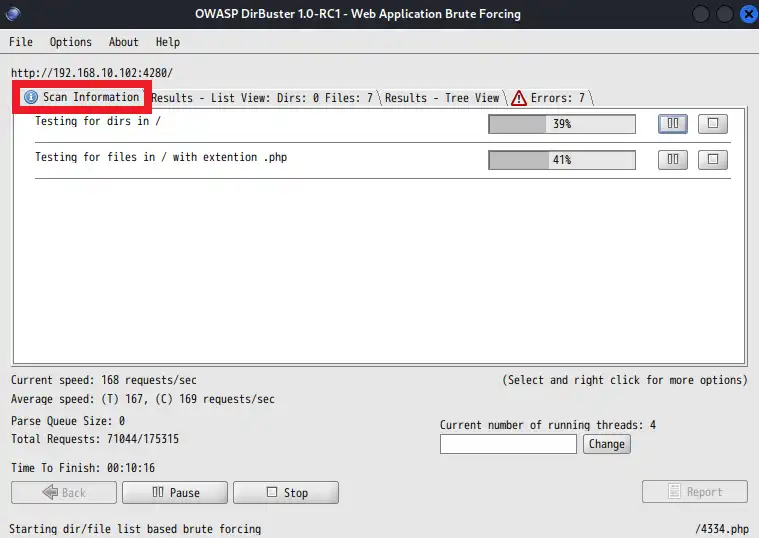
Scan Informationタブでは、スキャン全体のメタ情報が表示されます。
- スキャン対象URL
- 進捗率
- スキャン速度(リクエスト/秒)
- 総リクエスト数
- 終了までの時間
- スレッド数
Results - List Viewタブ
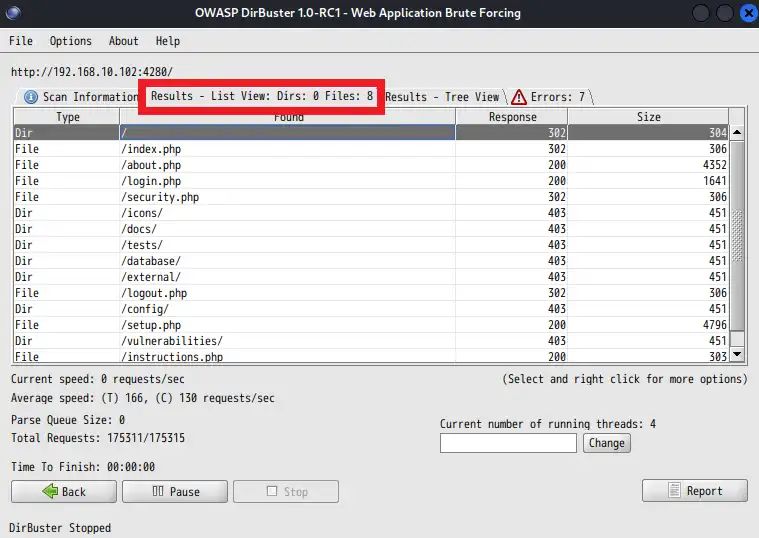
Results - List Viewタブでは、検出されたディレクトリおよびファイルが一覧形式で表示されます。
- Type:ディレクトリ or ファイル
- Found:検出されたパス
- Response:HTTPステータスコード(200、301、403 など)
- Size:レスポンスサイズ
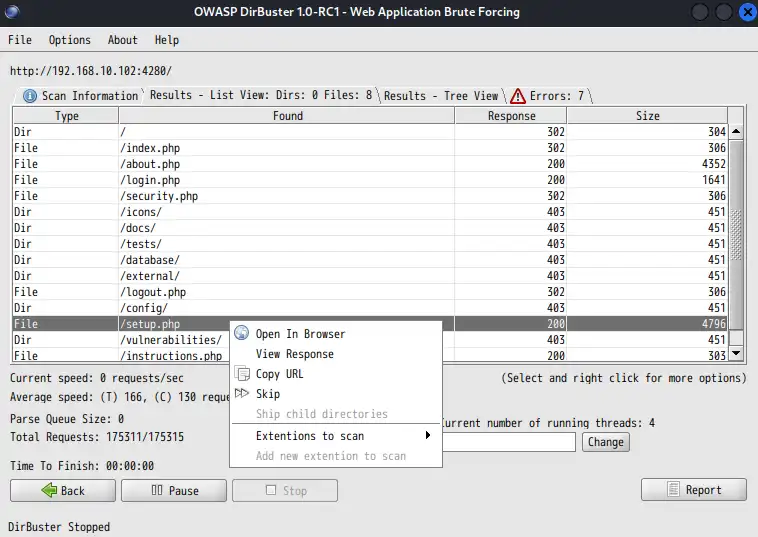
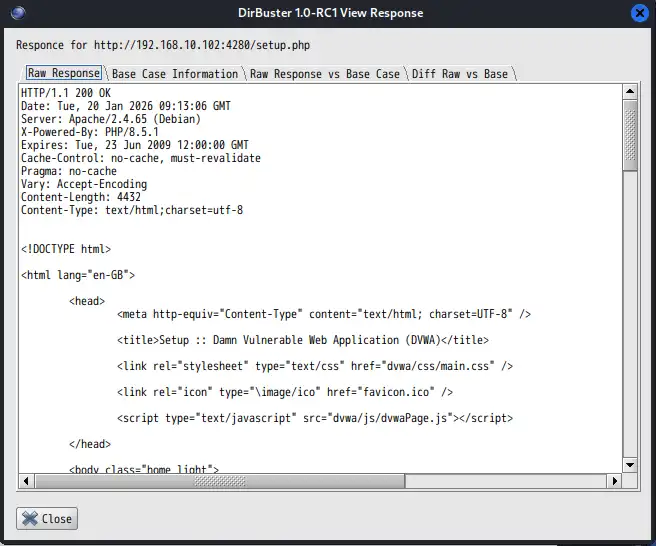
各行を右クリックすることで、検出されたURLをブラウザ表示したり、レスポンス内容(ヘッダー、ボディ)を表示することができます。
Results - Tree Viewタブ
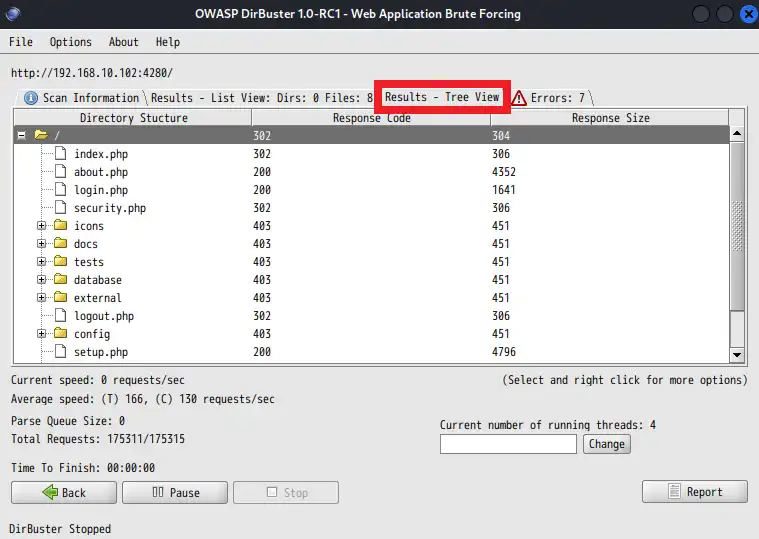
Results - Tree Viewタブでは、検出されたパスがディレクトリ構造としてツリー形式で表示されます。階層構造を確認できるため、Webサイトの構造を俯瞰的に把握するのに適しています。
Errorsタブ
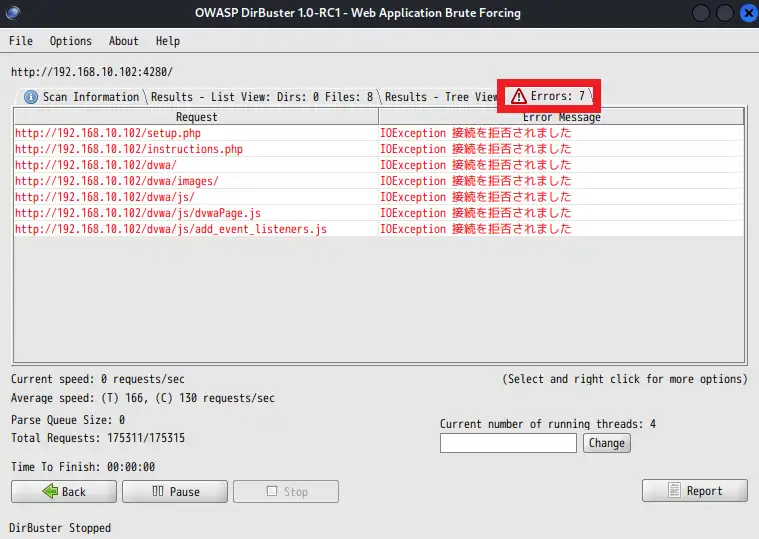
Errorsタブには、スキャン中に発生したエラーが記録されます。エラーが大量に発生している場合、スレッド数が多すぎる、ネットワーク帯域が不足している、WAFやレートリミットに検知されている、といった可能性が考えられます。
レポート出力
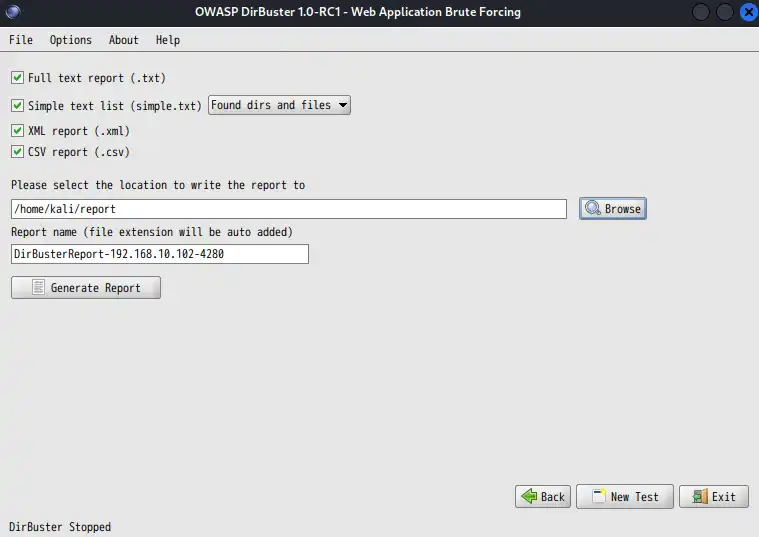
スキャン結果は、txt、csv、xmlの各形式で出力できます。
txt形式の出力例
$ cat /home/kali/report/DirBusterReport-192.168.10.102-4280.txt
DirBuster 1.0-RC1 - Report
http://www.owasp.org/index.php/Category:OWASP_DirBuster_Project
Report produced on Tue Jan 20 19:15:27 JST 2026
--------------------------------

http://192.168.10.102:4280
--------------------------------
Directories found during testing:

Dirs found with a 302 response:

/

Dirs found with a 403 response:

/icons/
/docs/
/tests/
/database/
/external/
/config/
/vulnerabilities/


--------------------------------
Files found during testing:

Files found with a 302 responce:

/index.php
/security.php
/logout.php
/phpinfo.php

Files found with a 200 responce:

/about.php
/login.php
/setup.php
/instructions.php


--------------------------------
txt(シンプル)形式の出力例
$ cat /home/kali/report/DirBusterReport-192.168.10.102-4280-simple.txt
/
/icons/
/docs/
/tests/
/database/
/external/
/config/
/vulnerabilities/
/index.php
/about.php
/login.php
/security.php
/logout.php
/setup.php
/instructions.php
/phpinfo.php
csv形式の出力例
$ cat /home/kali/report/DirBusterReport-192.168.10.102-4280.csv
"Found","Response Code","Content Length"
"/","302","304"
"/index.php","302","306"
"/about.php","200","4352"
"/login.php","200","1641"
"/security.php","302","306"
"/icons/","403","451"
"/docs/","403","451"
"/tests/","403","451"
"/database/","403","451"
"/external/","403","451"
"/logout.php","302","306"
"/config/","403","451"
"/setup.php","200","4796"
"/vulnerabilities/","403","451"
"/instructions.php","200","303"
"/phpinfo.php","302","306"
xml形式の出力例
$ cat /home/kali/report/DirBusterReport-192.168.10.102-4280.xml
<?xml version="1.0>
<DirBusterResults>
<Result type="Dir" path="/" responseCode="302" />
<Result type="File" path="/index.php" responseCode="302" />
<Result type="File" path="/about.php" responseCode="200" />
<Result type="File" path="/login.php" responseCode="200" />
<Result type="File" path="/security.php" responseCode="302" />
<Result type="Dir" path="/icons/" responseCode="403" />
<Result type="Dir" path="/docs/" responseCode="403" />
<Result type="Dir" path="/tests/" responseCode="403" />
<Result type="Dir" path="/database/" responseCode="403" />
<Result type="Dir" path="/external/" responseCode="403" />
<Result type="File" path="/logout.php" responseCode="302" />
<Result type="Dir" path="/config/" responseCode="403" />
<Result type="File" path="/setup.php" responseCode="200" />
<Result type="Dir" path="/vulnerabilities/" responseCode="403" />
<Result type="File" path="/instructions.php" responseCode="200" />
<Result type="File" path="/phpinfo.php" responseCode="302" />
</DirBusterResults>