

APT・Snap・PPA・公式バイナリ別にインストール手順を解説!
- UbuntuにGoをインストール -
UbuntuにGoをインストールする方法は1つではありません。APT、Snap、PPA、公式配布バイナリといった選択肢が存在します。
- APTパッケージ
- Snapパッケージ
- PPA(Personal Package Archive)
- Go公式配布のビルド済みバイナリ(tar.gz)
本記事では、それぞれの違いを比較し、実際のインストール手順をコマンド付きで解説しています。さらに、インストール後の動作確認まで網羅しているので、確実なセットアップが可能です。
インストール方法の違い
UbuntuにGoをインストールする方法はいくつか存在しますが、どの方法を選ぶかによって特徴や制約が異なります。
ここでは、よく使われる「APT」「Snap」「PPA」「公式配布バイナリ」のインストール方法について、それぞれのメリット・デメリットを解説します。
| インストールの容易さ | 最新バージョン対応 | 更新作業 | |
|---|---|---|---|
| APT | ◎ | △ (古い) | ◎ (apt upgrade) |
| Snap | ○ | ○ | ◎ (自動更新) |
| PPA | ○ | ○ | ◎ (apt upgrade) |
| 公式配布バイナリ | △ | ◎ (常に最新) | × (手動) |
APTパッケージ
APTはUbuntuの標準パッケージマネージャで、最も基本的なインストール方法です。
- メリット
- Ubuntu標準の
aptコマンドで導入・運用できるので、学習コストが少ない。 - セキュリティアップデートがUbuntuの標準リポジトリを通じて提供される。
- Ubuntu標準の
- デメリット
- 提供されるGoのバージョンは古いケースが多い。
Snapパッケージ
SnapはCanonical社が提供するパッケージ管理方式で、自己完結型のパッケージとして提供されます。
- メリット
- Ubuntu 24.04 LTSにも標準でSnapがインストールされているので、追加設定なしで利用できる。
- 比較的新しいGoが提供される。
- 自動更新が有効なため、セキュリティ対応の手間が少ない。
- 自己完結型パッケージのため、依存関係の衝突が起きにくい。
- デメリット
- クラシック制限で運用するため、サンドボックス環境ではない。
- Snap独自の実行環境により、外部ツールとの連携に影響する可能性がある。
PPA(Personal Package Archive)
PPA(※)からGoの最新バージョンを入手することができます。(※非公式の個人リポジトリ)
- メリット
- Ubuntu標準APTよりも新しいGoバージョンを利用できる。
- APT管理のため、既存の運用フローに組み込みやすい。
- デメリット
- 公式サポート対象外のため、メンテナンス停止のリスクがある。
Go公式配布のビルド済みバイナリ(tar.gz)
Go公式サイトから直接ダウンロードし、手動でインストールする方法です。
- メリット
- 最新版も含め、任意のGoバージョンを指定できる。
- 最も早く最新バージョンを導入できる。
- Go公式の提供物のみを使うため信頼性が高い。
- デメリット
- 更新機能がないため、セキュリティアップデートを手動で行う必要がある。
- PATH設定など初期設定が必要。
UbuntuにGoをインストールする
ここでは、Goの最新バージョンの取得、およびインストール手順について、「APT」「Snap」「PPA」「Go公式バイナリ」ごとに解説します。
- APTパッケージ
- Snapパッケージ
- PPA(Personal Package Archive)
- Go公式配布のビルド済みバイナリ(tar.gz)
なお、本記事で解説しているインストール手順は、Windows上の仮想環境に構築したUbuntu 24.04にて検証した結果に基づいています。また、各コマンドの実行結果は、実際にコマンドを実行した際の出力内容を掲載しています。
- Ubuntu 24.04 LTS
- Goをインストールしていないこと
本記事は、2026年1月31日時点の最新バージョンに基づいて作成しています。現在の最新バージョンについては、公式サイトをご確認ください。
APTパッケージ
Ubuntu標準のAPTパッケージを利用したGoのインストール手順を解説します。
パッケージリストの更新
$ sudo apt updateまず、パッケージリストを最新化します。この操作により、Ubuntuの公式リポジトリに登録されている最新のメタデータを取得します。
パッケージ情報の確認
$ apt show golang-go
Package: golang-go
Version: 2:1.22~2build1
Priority: optional
Section: devel
Source: golang-defaults
Origin: Ubuntu
Maintainer: Ubuntu Developers <ubuntu-devel-discuss@lists.ubuntu.com>
Original-Maintainer: Debian Go Compiler Team <team+go-compiler@tracker.debian.org>
Bugs: https://bugs.launchpad.net/ubuntu/+filebug
Installed-Size: 70.7 kB
Depends: golang-1.22-go, golang-src (>= 2:1.22~2build1)
Suggests: git
Conflicts: gccgo-go
Breaks: gccgo-5 (<< 5.3.1-12~), gccgo-6 (<< 6-20160319-1~), golang-go-darwin-386, golang-go-darwin-amd64, golang-go-freebsd-386, golang-go-freebsd-amd64, golang-go-freebsd-arm, golang-go-linux-386, golang-go-linux-amd64, golang-go-linux-arm, golang-go-netbsd-386, golang-go-netbsd-amd64, golang-go-windows-386, golang-go-windows-amd64
Replaces: golang-go-darwin-386, golang-go-darwin-amd64, golang-go-freebsd-386, golang-go-freebsd-amd64, golang-go-freebsd-arm, golang-go-linux-386, golang-go-linux-amd64, golang-go-linux-arm, golang-go-netbsd-386, golang-go-netbsd-amd64, golang-go-windows-386, golang-go-windows-amd64
Homepage: https://golang.org
Download-Size: 43.9 kB
APT-Sources: http://jp.archive.ubuntu.com/ubuntu noble/main amd64 Packages
Description: Go programming language compiler, linker, compiled stdlib
 The Go programming language is an open source project to make programmers more
 productive. Go is expressive, concise, clean, and efficient. Its concurrency
 mechanisms make it easy to write programs that get the most out of multicore
 and networked machines, while its novel type system enables flexible and
 modular program construction. Go compiles quickly to machine code yet has the
 convenience of garbage collection and the power of run-time reflection. It's a
 fast, statically typed, compiled language that feels like a dynamically typed,
 interpreted language.
 .
 This is a dependency package that depends on the default Go toolchain and
 compiled standard library. It is only built on architectures that have a
 native toolchain ("gc compiler"). Packages that want to build with whichever
of gc or gccgo is available should depend on golang-any.インストールするgolang-goパッケージの詳細を確認します。Ubuntu 24.04 LTSの公式リポジトリでは、Go 1.22系が提供されています。(2026年1月30日時点)
Goのインストール
$ sudo apt install golang-goパッケージ情報に問題がなければ、Goをインストールします。
Snapパッケージ
Snapは、Canonical社が提供するパッケージ管理システムです。Ubuntu 24.04 LTSにも標準で搭載されているため、追加設定なしで利用できます。
Snapパッケージの詳細確認
$ snap info go
name:      go
summary:   The Go programming language
publisher: Canonical
store-url: https://snapcraft.io/go
contact:   https://bugs.launchpad.net/go-snap/+filebug
license:   BSD-3-Clause
description: |
  Go is an open source programming language that enables the production of simple, efficient and
  reliable software at scale.
snap-id: Md1HBASHzP4i0bniScAjXGnOII9cEK6e
channels:
  latest/stable:       1.25.6       2026-01-27 (11048)  55MB classic
  latest/candidate:    ↑
  latest/beta:         ↑
  latest/edge:         1.25-ecc06f0 2025-04-09 (10896) 117MB classic
  1.25-fips/stable:    1.25.6-fips  2026-01-26 (11056)  56MB classic
  1.25-fips/candidate: 1.25.6-fips  2026-01-26 (11056)  56MB classic
  1.25-fips/beta:      ↑
  1.25-fips/edge:      ↑
  1.25/stable:         1.25.6       2026-01-26 (11048)  55MB classic
  1.25/candidate:      1.25.6       2026-01-26 (11048)  55MB classic
  1.25/beta:           ↑
  1.25/edge:           ↑
  1.24-fips/stable:    1.24.12-fips 2026-01-26 (11053)  73MB classic
  1.24-fips/candidate: 1.24.12-fips 2026-01-26 (11065)  73MB classic
  1.24-fips/beta:      ↑
  1.24-fips/edge:      ↑
  1.24/stable:         1.24.12      2026-01-26 (11047)  73MB classic
  1.24/candidate:      1.24.12      2026-01-26 (11047)  73MB classic
  1.24/beta:           ↑
  1.24/edge:           ↑
  1.23-fips/stable:    1.23.12-fips 2026-01-27 (10978)  68MB classic
  1.23-fips/candidate: 1.23.12-fips 2026-01-27 (11012)  69MB classic
  1.23-fips/beta:      ↑
  1.23-fips/edge:      ↑
  1.23/stable:         1.23.12      2025-10-16 (10937)  68MB classic
  1.23/candidate:      1.23.12      2025-11-11 (10996)  68MB classic
  1.23/beta:           ↑
  1.23/edge:           ↑
〜 以下、省略 〜
まず、Snapパッケージとして提供されているGoの情報を確認します。
- 提供元:Canonical
- 現在のバージョン番号:1.25.6
- Classic confinementの有無:有
latest/stableからlatest/edgeまで複数のチャンネルが提供されており、安定版または開発中のバージョンを選択できます。
Goのインストール
$ sudo snap install --classic go--classic:クラシック制限(セキュリティ制限を緩和し、Goがインストールできるようにする)
Snap版Goをインストールします。前述の通り、Classic confinementが必要なため、--classicオプションを付けて実行します。
PPA(Personal Package Archive)
ここでは、Goコミュニティでも広く利用されているlongsleep/golang-backports PPAを使用します。
外部リポジトリ(PPA)の追加
$ sudo add-apt-repository ppa:longsleep/golang-backportsまず、APTリポジトリにPPAを追加します。このコマンドを実行すると、/etc/apt/sources.list.d/配下にPPA定義ファイルが追加されます。
パッケージリストの更新
$ sudo apt updatePPAを追加後、パッケージリストを更新して、新しく追加したリポジトリの情報をAPTに認識させます。この更新により、
- 既存のUbuntu公式リポジトリ
- 追加したlongsleep/golang-backports PPA
の両方が参照され、より新しいGoパッケージがAPTの候補として認識されます。
パッケージ情報の確認
$ apt show golang-go
Package: golang-go
Version: 2:1.25~0longsleep1
Priority: optional
Section: golang
Source: golang-defaults
Maintainer: Debian Go Compiler Team <team+go-compiler@tracker.debian.org>
Installed-Size: 71.7 kB
Depends: golang-1.25-go, golang-src (>= 2:1.25~0longsleep1)
Suggests: git
Conflicts: gccgo-go
Breaks: gccgo-5 (<< 5.3.1-12~), gccgo-6 (<< 6-20160319-1~), golang-go-darwin-386, golang-go-darwin-amd64, golang-go-freebsd-386, golang-go-freebsd-amd64, golang-go-freebsd-arm, golang-go-linux-386, golang-go-linux-amd64, golang-go-linux-arm, golang-go-netbsd-386, golang-go-netbsd-amd64, golang-go-windows-386, golang-go-windows-amd64
Replaces: golang-go-darwin-386, golang-go-darwin-amd64, golang-go-freebsd-386, golang-go-freebsd-amd64, golang-go-freebsd-arm, golang-go-linux-386, golang-go-linux-amd64, golang-go-linux-arm, golang-go-netbsd-386, golang-go-netbsd-amd64, golang-go-windows-386, golang-go-windows-amd64
Download-Size: 45.5 kB
APT-Sources: https://ppa.launchpadcontent.net/longsleep/golang-backports/ubuntu noble/main amd64 Packages
Description: Go programming language compiler, linker, compiled stdlib
 The Go programming language is an open source project to make programmers more
 productive. Go is expressive, concise, clean, and efficient. Its concurrency
 mechanisms make it easy to write programs that get the most out of multicore
 and networked machines, while its novel type system enables flexible and
 modular program construction. Go compiles quickly to machine code yet has the
 convenience of garbage collection and the power of run-time reflection. It's a
 fast, statically typed, compiled language that feels like a dynamically typed,
 interpreted language.
 .
 This is a dependency package that depends on the default Go toolchain and
 compiled standard library. It is only built on architectures that have a
 native toolchain ("gc compiler"). Packages that want to build with whichever
 of gc or gccgo is available should depend on golang-any.

N: 追加レコードが 1 件あります。表示するには '-a' スイッチを付けてください。golang-goパッケージの提供元とバージョンを確認します。
- APT-Sources:https://ppa.launchpadcontent.net/longsleep/golang-backports/ubuntu noble/main amd64 Packages
- Version:2:1.25~0longsleep1
提供元はlongsleep/golang-backports PPA、バージョンは1.25であることが確認できます。
Goのインストール
$ sudo apt install golang-goaptコマンドで、Goをインストールします。
Go公式配布のビルド済みバイナリ(tar.gz)
Go言語の公式サイトでは、各OS・アーキテクチャごとにビルド済みバイナリが提供されています。ビルド済みバイナリからインストールすることで、APTやSnapの更新サイクルに依存せず、最新版を含む任意のバージョンを導入できます。
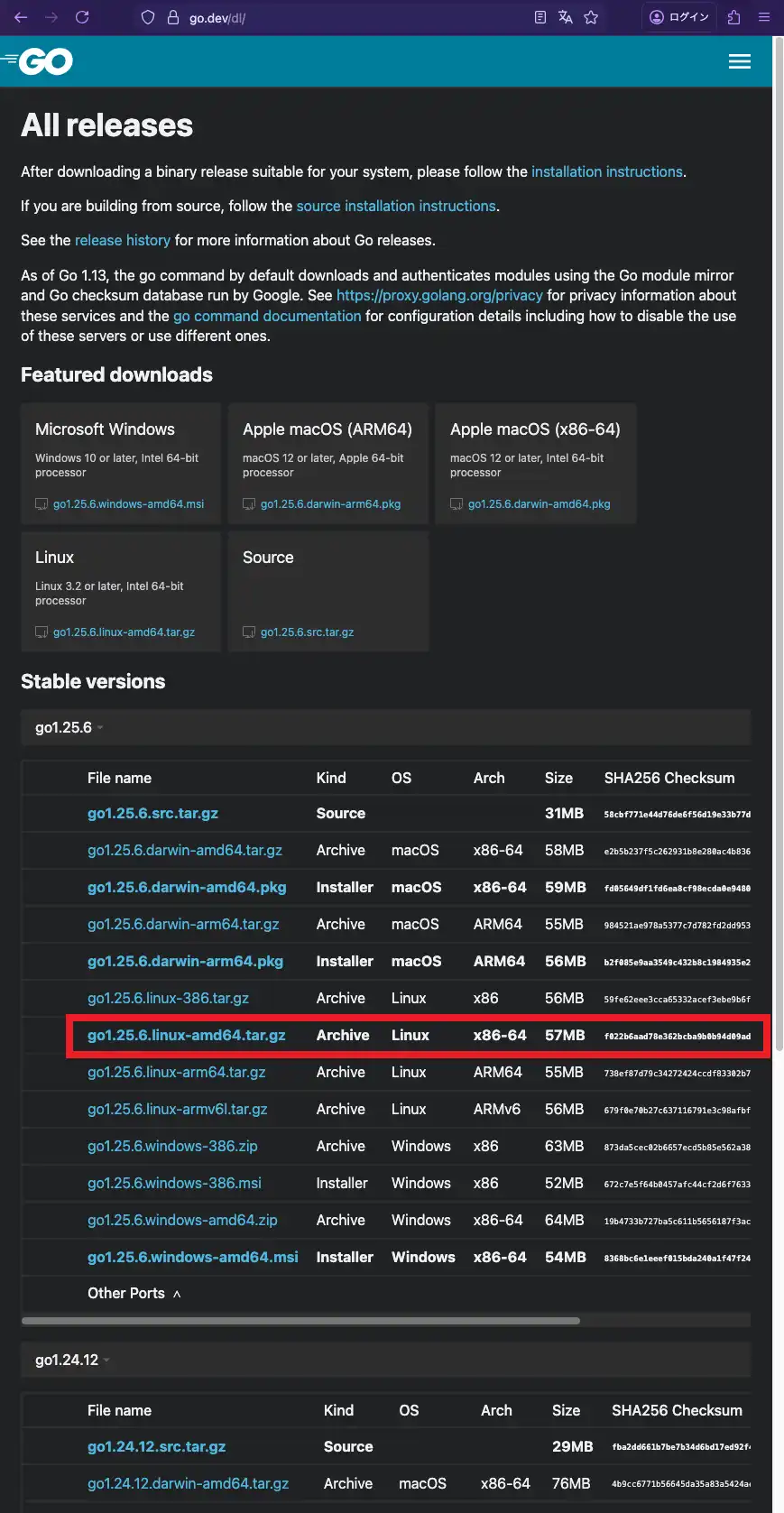
ビルド済みバイナリのダウンロード
wgetコマンドでダウンロードする場合
$ wget https://go.dev/dl/go1.25.6.linux-amd64.tar.gzwgetは標準的なHTTPクライアントで、CLI環境やサーバ用途では、wgetを使う方法が一般的です。ダウンロード完了後、カレントディレクトリにgo1.25.6.linux-amd64.tar.gzが保存されます。
curlコマンドでダウンロードする場合
$ curl -LO https://go.dev/dl/go1.25.6.linux-amd64.tar.gz-L:リダイレクト追従-O:リモートと同じファイル名で保存
wgetと同様、curl も Ubuntu環境に標準でインストールされており、追加パッケージ不要で利用できます。ダウンロードしたファイルは、curlコマンドを実行したディレクトリに保存されます。
既存フォルダの削除
$ sudo rm -rf /usr/local/go既に/usr/local/goに旧バージョンのGoが存在する場合、競合を避けるために削除します。
アーカイブファイルの展開
$ sudo tar -C /usr/local/ -xzf go1.25.6.linux-amd64.tar.gzダウンロードしたアーカイブファイルを/usr/local配下に展開します。/usr/local/goディレクトリが作成され、そこにGoのバイナリやライブラリなどが配置されます。
$ ls -l /usr/local/go/
合計 76
-rw-r--r--  1 root root  1337  1月  9 06:56 CONTRIBUTING.md
-rw-r--r--  1 root root  1453  1月  9 06:56 LICENSE
-rw-r--r--  1 root root  1303  1月  9 06:56 PATENTS
-rw-r--r--  1 root root  1454  1月  9 06:56 README.md
-rw-r--r--  1 root root   426  1月  9 06:56 SECURITY.md
-rw-r--r--  1 root root    35  1月  9 06:56 VERSION
drwxr-xr-x  2 root root  4096  1月  9 06:56 api
drwxr-xr-x  2 root root  4096  1月  9 06:56 bin
-rw-r--r--  1 root root    52  1月  9 06:56 codereview.cfg
drwxr-xr-x  3 root root  4096  1月  9 06:56 doc
-rw-r--r--  1 root root   505  1月  9 06:56 go.env
drwxr-xr-x  5 root root  4096  1月  9 06:56 lib
drwxr-xr-x  7 root root  4096  1月  9 06:56 misc
drwxr-xr-x  4 root root  4096  1月  9 06:56 pkg
drwxr-xr-x 56 root root  4096  1月  9 06:56 src
drwxr-xr-x 28 root root 16384 1月 9 06:56 testアーカイブファイルの削除
$ rm go1.25.6.linux-amd64.tar.gz展開後はアーカイブファイルは不要なため、削除して構いません。
Goバイナリを環境変数に追加
$ echo 'export PATH=$PATH:/usr/local/go/bin' >> ~/.profile
$ source ~/.profileGoコマンドをどこからでも実行できるよう、PATHにGoのバイナリパスを追加します。
インストール後の動作確認
Goのインストールが正しく完了しているかを確認するための基本的なチェック手順を解説します。「どのバイナリが実行されているか」「想定したバージョンか」「環境変数が正しく設定されているか」の3点を確認することが重要です。
実行ファイルのパス確認
$ which go

# インストール別の実行結果
/usr/bin/go             # APT
/snap/bin/go            # Snap
/usr/bin/go             # PPT
/usr/local/go/bin/go # 公式配布バイナリ(tar.gz)まず、goコマンドがどのパスを参照しているかを確認します。
バージョン確認
$ go version

# インストール別の実行結果
go version go1.22.2 linux/amd64    # APT
go version go1.25.6 linux/amd64    # Snap
go version go1.25.6 linux/amd64    # PPT
go version go1.25.6 linux/amd64    # 公式配布バイナリ(tar.gz)
次に、Goのバージョンを確認します。
Goの環境変数の確認
$ go env | grep -E "GOROOT|GOPATH"

# インストール別の実行結果
GOROOT='/usr/lib/go-1.22'    # APT
GOROOT='/snap/go/11048'      # Snap
GOROOT='/usr/lib/go-1.25'    # PPT
GOROOT='/usr/local/go'       # 公式配布バイナリ(tar.gz)

GOPATH='/home/user/go'       # APT
GOPATH='/home/user/go'       # Snap
GOPATH='/home/user/go'       # PPT
GOPATH='/home/user/go' # 公式配布バイナリ(tar.gz)- GOROOT:Go本体のインストール先
- GOPATH:Goプロジェクトのワークスペース
Goが認識している環境変数を確認します。(約50項目の環境変数を定義しているため、ここでは特に重要な環境変数のみを抜粋しています。)
最後に、go installコマンドを使用してGo製CLIツールを導入する場合、インストール先のディレクトリにパスを通しておきましょう。
$ echo 'export GOPATH=$(go env GOPATH)' >> ~/.profile
$ echo 'export PATH=$PATH:$GOPATH/bin' >> ~/.profile
$ source ~/.profile